Awakepilot 0.14 is available

Keep your Mac awake
while the work goes on.

Keep builds, video exports, and large file transfers running without automatic sleep. Set a timer or choose conditions to follow. Awakepilot stops keeping your Mac awake when the timer ends or those conditions no longer apply, unless other active work still needs it.
macOS 13+ Apple Silicon + IntelSigned and Apple-notarized
Awakepilot
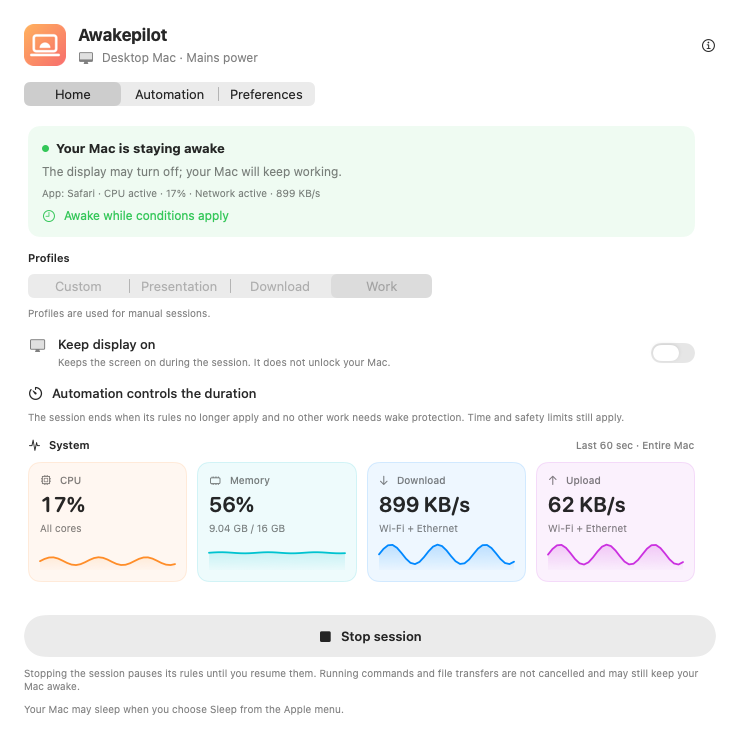
Awakepilot dashboard showing an active wake session and live system metrics
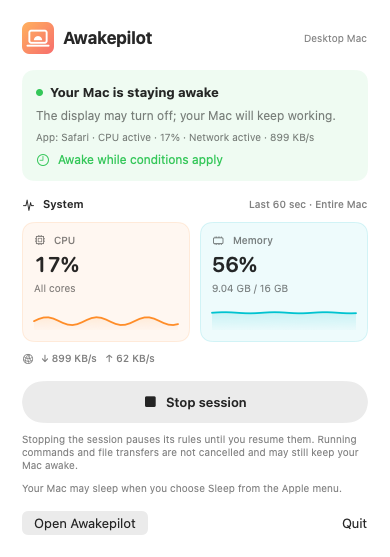
Awakepilot compact menu bar panel
Mac is staying awake
15 start conditionsFrom processes and CPU to Wi-Fi, VPN, and drives
Settings for each conditionProfile, screen behavior, and safety limit for every rule
Private by designNo account, analytics, ads, or telemetry
6 languagesEnglish, German, Spanish, French, Azerbaijani, and Turkish
Built for work that must finish

Start with a timer.
Add rules when you need them.

Choose a duration or set the conditions that should start a session. When wake protection ends, your Mac can sleep according to its settings; it is not put to sleep immediately.

Flexible wake sessions

Stay awake indefinitely, for a duration, or until an exact date and time.

15m1h2h∞

Live system insights

Watch CPU, memory, download, and upload activity through clear live graphs.

Smart automation

Choose what to watch first. Keep your Mac awake while an app is open, a process runs, or a selected drive is connected.

xcodebuild is runningActive

Power-aware

Respect power adapters, battery thresholds, UPS state, and display preferences.

Drive Alive

Help keep selected external drives active by regularly updating one small file on each writable drive.

Explainable history

See when wake protection started, why it continued, and when it stopped.
Automation
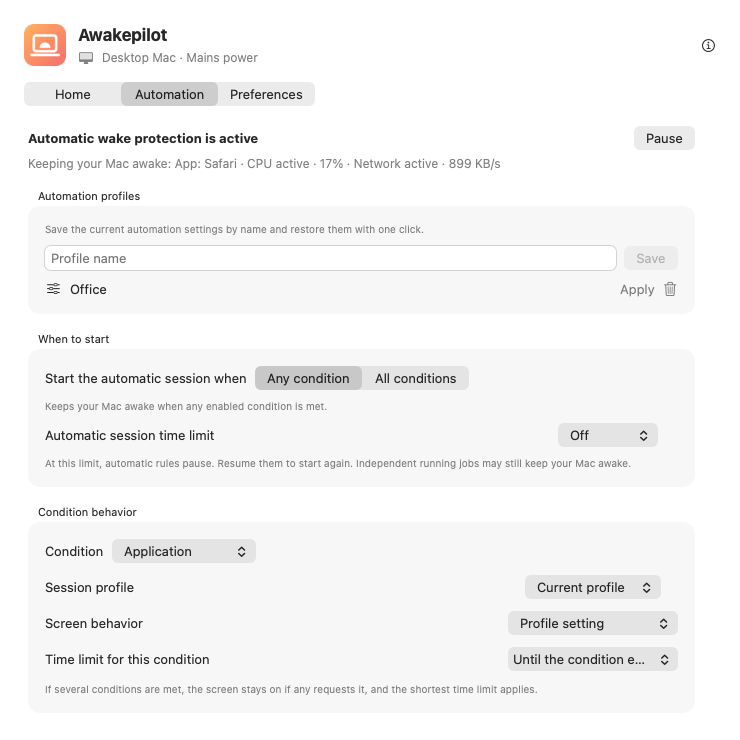
Awakepilot automation profiles and per-condition controls
Automation that explains itself

Choose when your Mac stays awake.

See the apps, processes, and other conditions keeping your Mac awake. When your rules no longer apply and no other active work needs wake protection, your Mac can use its normal sleep settings.

An open app does not prove that a job is still running. Lower CPU or network activity does not confirm that the work has finished either.

  • ✓
    Apps, processes, and connectionsFollow apps, terminal tools, Wi-Fi networks, VPNs, external drives, and commands while they run.
  • ✓
    Named automation profilesSave complete rule sets and switch between office, travel, render, or download workflows.
  • ✓
    Settings for each conditionChoose a session profile, screen behavior, and time limit for every condition.
  • ✓
    Visible history and safety limitsReview starts, stops, and rule changes while battery and thermal limits remain in control.
A rule you can read

Build automation like a sentence.

Choose what Awakepilot watches, how the screen behaves, and a time limit. Review active conditions and recent changes in the app.

When

One of these conditions is met

⌘ xcodebuildCPU ≥ 65%Studio Wi-FiWork VPNArchive SSD
Choose “all conditions” if they must be met at the same time.
Then

Use the Work profile

Keep the Mac awakeAllow display sleepStop after 4 hours
Each condition can choose its own profile, display behavior, and limit.
Finally

Stop keeping awake

Automatic
When no other job or rule is active, your Mac can use its normal sleep settings. Your previous screen and timer settings are restored.
⌁
Named profile

Office

4 rules

Start on the studio network or work VPN. Keep the display available for calls and stop at the safety limit.

Wi-FiVPNDisplay on
◫
Named profile

Render night

3 rules

Watch the export process by name and allow the screen to turn off. Wake protection ends when that process stops, unless another rule or job still needs it.

ProcessCPU8h limit
↻
Named profile

Backup drive

2 rules

React when an archive disk mounts, protect the copy, and use Drive Alive only on the selected writable volume.

DriveDrive AliveDisplay off
When should your Mac stay awake?

Watch the work from every useful angle.

Start when one condition is met, or require all your selected conditions at once. For example, run only on your office Wi-Fi with an external drive connected.

See what keeps your Mac awake.Check the active conditions in the panel and recent changes in the activity history.
▣ApplicationsSafari, Xcode, Final Cut, or any app
⌘ProcessesAgents, builds, encoders, and scripts
⌁Wi-Fi & VPNReact to where and how you connect
▰External drivesStart when a selected volume mounts
⌁CPU & networkFollow active compute and transfers
◷Time & hardwareSchedules, power, and external displays
⌁USB & BluetoothFollow selected connected devices
♫Audio outputReact to the selected output route
◎DNS & IP networksMatch server addresses and CIDR ranges
Drive Alive, with guardrails

Keep your selected external drive active.

Awakepilot refreshes one tiny marker on the writable external drives you choose. It never overwrites another app’s file, and removes its own marker when Drive Alive is disabled—even after a drive reconnects.

  • Choose each drive explicitly
  • Set a 5, 10, 15, 30, or 60 minute interval
  • See success and write errors in the app
  • Keep battery, thermal, and duration limits active
External drivesProtected locally
▰
Archive SSD2 TB · writable
Active
Refresh interval15 minutes
Awakepilot’s own fileVerified
22:00 Drive mounted
22:00 Wake session started
22:15 Drive Alive refreshed
Later Wake protection ended
Activity historyStored only on this Mac
Automation startedProcess: ffmpeg · CPU active
Conditions changedNetwork activity joined the session
Safety limit reachedStopped after 4 hours
Trust comes from visibility

Review starts, stops, and changes.

A wake utility should never leave you guessing. Awakepilot records meaningful transitions without flooding the timeline with every live CPU or network sample.

200 recent local events0 telemetry events1 click to clear history
One utility, many workflows

Let the task finish.

↓

Large transfers

Watch network activity or a connected backup drive. The rule ends when activity stays below your threshold or the drive disconnects.

⌘

Builds and AI agents

Watch a terminal process by name or keep your Mac awake for the lifetime of a command.

▰

Presentations

Apply a display-on profile only while the presentation condition is active.

↗

Remote access

Keep the Mac reachable with power and duration safeguards still enforced.

Privacy is a feature

Your workflow stays on your Mac.

No account. No ads. No analytics. No telemetry. Awakepilot stores its settings locally and only contacts GitHub to check for updates.

Read the privacy details →

Local settingsYour preferences remain in your macOS account.
Zero trackingNo behavior profiles or third-party analytics.
Verified updatesFile integrity and developer signature checked before installation.
Ready when your work runs long

Keep moving with Awakepilot.

Download the signed and Apple-notarized universal build for macOS.

Drag to Applications. No account or subscription required.